Sharing your positionHow-to
How to get friends and family following you in a race
The short answer
Turn on live tracking for your race in Windline or RunFast, then send your follow link, or its share picture, to the people you want watching. They open it in any browser, with no app or account, and see your dot, your finish time and the weather where you are. Send it again on race morning.
Turn on live tracking for the race
In Windline, open the race's Live tracking card (Race settings, or Your goal and live tracking on a club race). In RunFast, switch on Live tracking on the race. Your follow link appears.
Add a photo, a goal and your words
Add a profile photo so the share picture shows you. Set a goal time if you want followers to see your ghost, and up to 60 characters of your own words.
Send the link or the picture
Windline: tap Share my live tracking, or Share picture for WhatsApp and socials. RunFast: under the share picture, tap Share, Save the picture or WhatsApp.
Tell them what to expect
Say it opens in any browser with no account, that the dot moves while you race, and that a pause usually means no signal for a while.
Send it again on race morning
Post the link once more before the start, in the family group chat or as a WhatsApp Status, so it's at the top when people look.
Go live at the start
Tap the reminder, or open the race and tap Go live, then Start live tracking. Your followers see you appear and start moving.
Your follow link is all your family and friends need. Send it, or the picture that comes with it, and they can watch you from anywhere, in any browser. This guide covers what to send, when to send it, what to tell them and what they'll see.
What should I send them?
Send your follow link, or the share picture with the link under it. Both come from the race's live tracking card, in the Windline or RunFast app.
- The link: windline.tech/f/ and a short code for a rider, runfast.tech/f/ and a code for a runner. It's the same for every race until you reset it, so the people who had it last time still have it.
- The share picture: made for WhatsApp and socials, with your name, the race and your goal. RunFast's is tall, for Instagram Stories and WhatsApp Status, and also shows your photo, the race's date and gun time, your own words and the course.
- The message: RunFast writes it for you: "Follow me live at" the race "on RunFast", then your words, then the link.
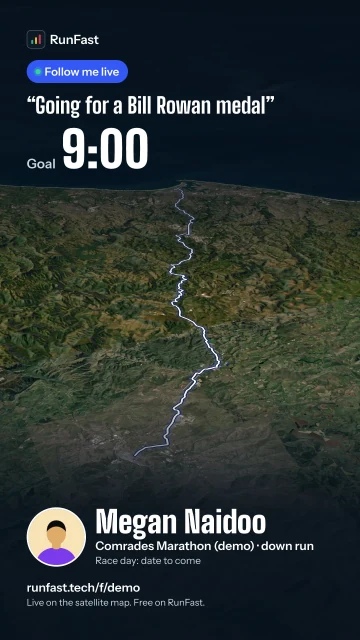
Add a profile photo first, so the picture shows you. Windline makes its picture from your name, the race and your goal.
How do I send my link?
Open the race's live tracking card in the app and tap Share. The phone's own share sheet does the rest.
- Windline: on your own race, tap it under Organising, then the gear: the card is in Race settings. On a club race you're riding, tap Your goal and live tracking under the race. Tap Share my live tracking for the link, or Share picture for WhatsApp and socials.
- RunFast: open the race's live tracking (Edit on your own race, or Your goal and live tracking on a club race). Under Share it with your picture, tap Share, Save the picture or WhatsApp. Or, in Runs, tap ⋯ on the race and choose Share my live tracking.
RunFast's card works on runfast.tech too. If you change your goal or your words after the picture is made, RunFast dims it and remakes it the next time you share or save it.
When should I send it?
Send it early, and again on the morning. People look for the link when they want to watch, and by then it's often far up the chat.
| When | What to do |
|---|---|
| A week before | Send the link to the people who'll want to watch, so they can open it and see your race and start time. |
| The day before | Post the share picture to your WhatsApp Status or Instagram Story, if you'd like a wider circle following. |
| Race morning | Send the link once more in the family group chat, and pin it. |
| At the start | Go live. Followers see your dot appear and start moving. |
| After the finish | Your time is on your page. Followers can send a congratulation for 24 hours. |
Will family abroad see the right times?
Yes, as long as they know the times are the race's. Finish times on the live page are in the race's own time zone, so "~14:21" means 14:21 where you're racing. When you send the link to someone in another country, give them your start time in theirs.
Distances follow where their device is: miles in the US and the UK, kilometres in most other places. Your own app keeps your own units.
Should I post my link publicly?
That's your choice. A public post means anyone who sees it can follow you while you're live, which is lovely for a charity ride or a big race and less so for a small one near home.
If you do post it, a Story or Status that disappears after a day is a good fit. Then reset your link after the race: RunFast suggests it for exactly this case. People you approved in the app keep following; everyone else needs the new link.
What should I tell them?
Tell them it opens in a browser and that a still dot doesn't mean trouble. Something like this works:
Here's my live link for Saturday's race. Open it in your browser: no app or account needed. My dot moves while I race. If it stops for a while, I've probably lost signal, and it catches up. You can give me a tap on the back from the page.
That covers the three questions followers ask most: do I need the app, why has it stopped, and can I cheer.
What will they see?
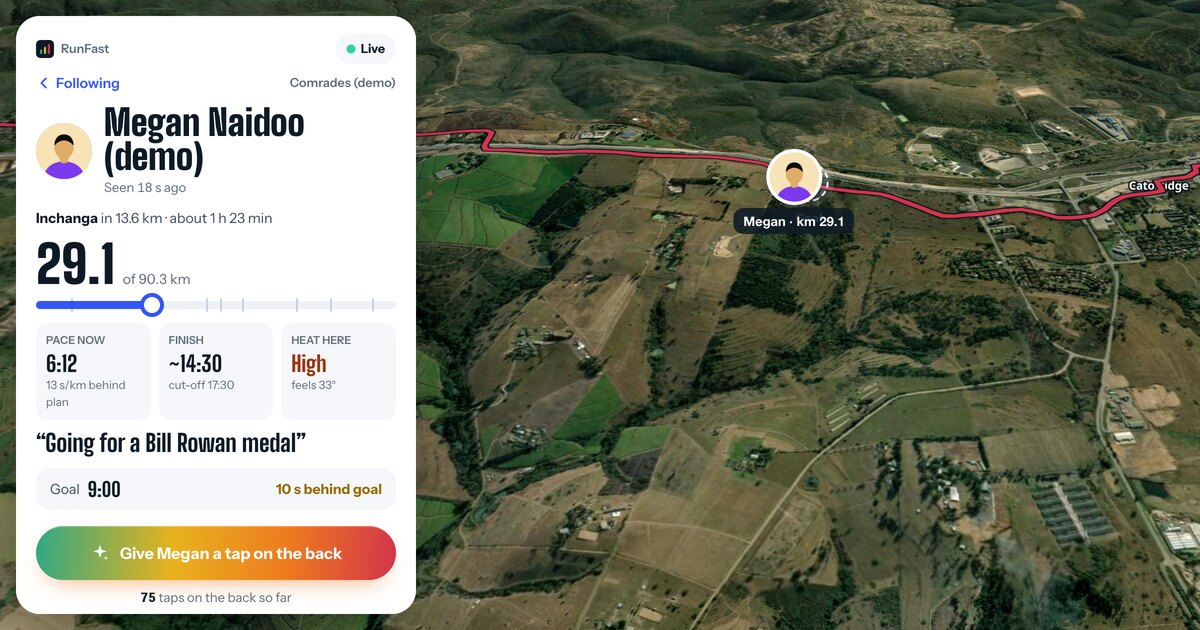
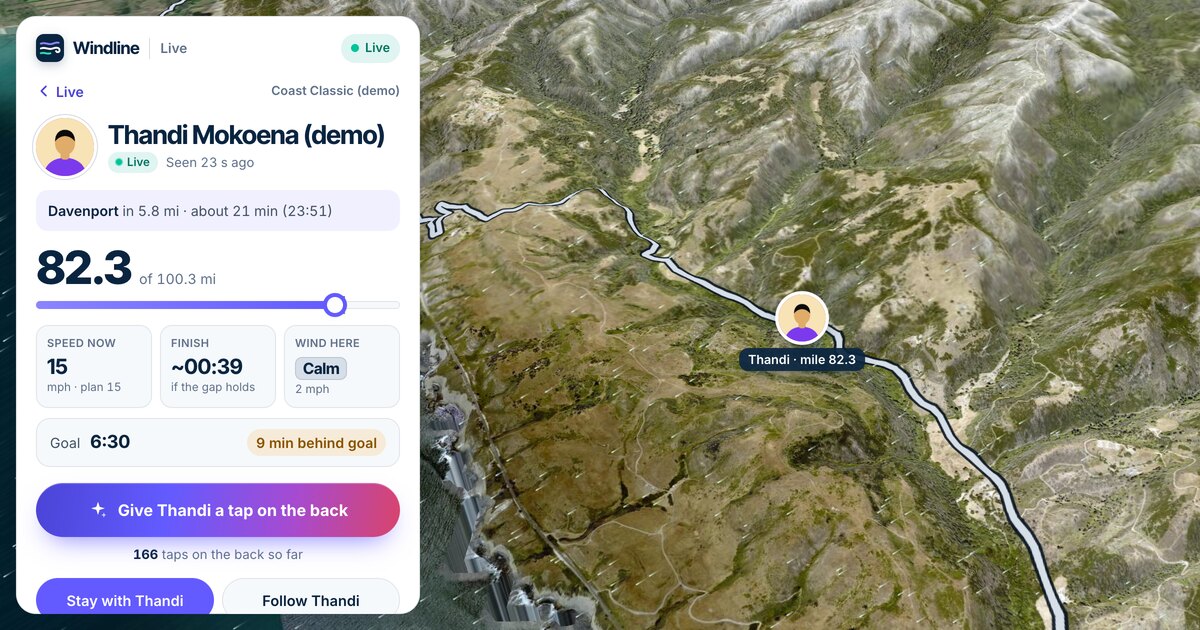
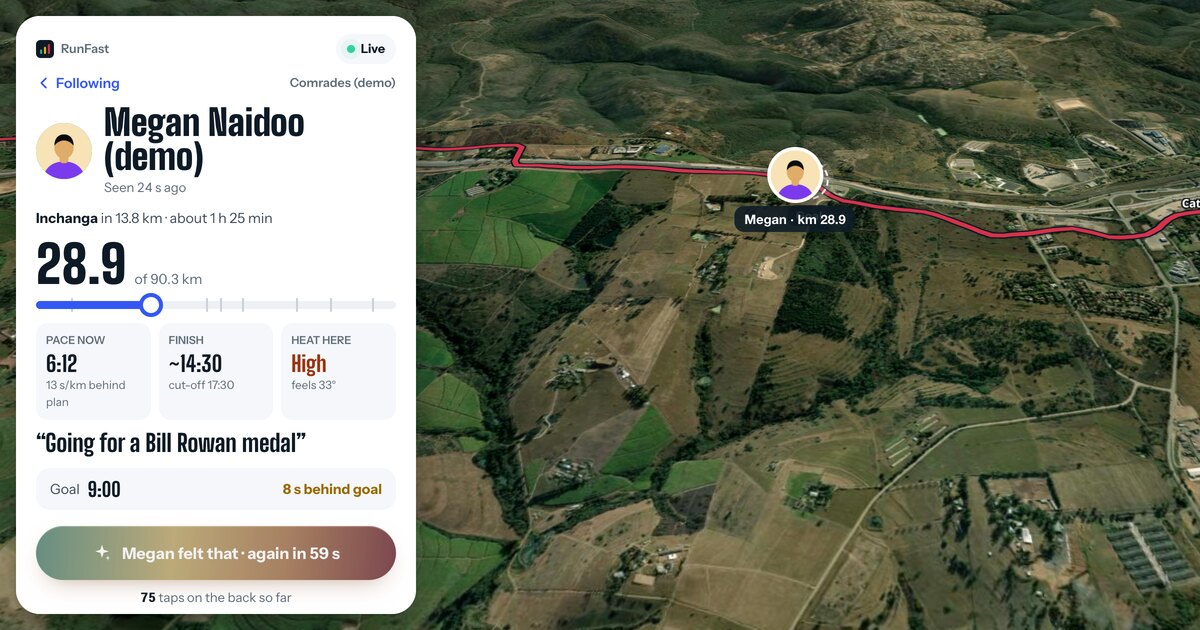
Before the start, your race and when it starts. Once you're live, your dot on the course, your distance, your speed or pace, your finish time and the weather where you are.
- Before the start: your race and its start time. RunFast also shows a countdown to the gun, your goal and your words.
- During the race: where you are, how far you've come and how far to go, your speed (cyclists) or pace (runners), your finish time and the wind or heat where you are. With a goal, a faint Goal marker shows where you'd be at your goal pace, and your card says "4 min ahead of goal" or "2 min behind goal".
- At the finish: your time, and against your goal if you set one.
The follower's side, step by step, is in how to track someone in a race.
Can they get an alert when I start?
Yes, in the app. In Windline, they open you in the app, tap Alerts and choose Started, Halfway and Finished. In RunFast, they follow you in the app from your link and tap Turn on alerts. No account is needed for either. A browser doesn't send alerts.
Both apps are on Android today, from windline.tech/android and runfast.tech/android. Both iPhone apps are with the App Store for review. Family on iPhones can follow in Safari.
Can they cheer me on?
Yes. Your page has a button that gives you a tap on the back, one a minute per person. Your phone buzzes (on Windline, once and with no sound), and you see the count, with names for people who are signed in. After you finish, the button becomes Congratulate for 24 hours. See taps on the back.
What if I don't want everyone to have it?
Anyone with your link can follow you, so send it to the people you mean, and reset it if it travels further than you'd like. Resetting gives you a new link at once: anyone with only the old one stops seeing you, and people you approved in the app keep following.
You can also remove a follower in the app, block someone, or stop sharing with link holders altogether. The steps are in how to stop someone following you.
Can my club follow me too?
Yes, on a club race. Tap I'm riding (Windline) or I'm in (RunFast) on the race, and you're on the club's race map on the day if you share with your club or chose Findable by anyone. RunFast's club map shows runners who chose Findable. The club shares one link for everyone: see live tracking for clubs.
For the whole picture of sharing, including who can see you and how race day works, see how to share your live location in a race and go live on race day.
Questions
Do my family need to download an app to follow me?
No. Your link opens in any browser on a phone or computer, with no app and no account. If they want an alert when you start, reach halfway and finish, they can follow you in the Windline or RunFast app.
Can I send my link before race day?
Yes. You have one link, the same for every race, until you reset it. Before the start it shows your race and when it starts, and on RunFast a countdown to the gun, your goal and your words.
Will they get a notification when I start?
Only in the app, with alerts on: Started, Halfway and Finished. A browser doesn't send alerts, so tell them to keep the page open or check back.
Can people forward my link to others?
Yes, and anyone who has it can follow you. That's what the link is for. If it ends up somewhere you don't want it, reset it: anyone with only the old link stops seeing you.
What name do my followers see?
The first and last name on your account, as you set them. Never your email address or your phone number.