Sharing your positionHow-to
How to go live on race day, step by step
The short answer
Tap the reminder before the start, or open the race in the Windline or RunFast app and tap Go live, then Start live tracking. Allow location while using the app, and on Android let the app run in the background. Pocket the phone: it sends your position every 30 seconds and stops by itself at the finish.
Check live tracking is on for the race
Windline switches it on for a new race. In RunFast, switch on Live tracking on the race before race day.
Tap the reminder, or open the race
Windline reminds you about 30 minutes before the start; RunFast 2 hours before the gun, with a Go live button. Or open the race in the app and tap Go live.
Tap Start live tracking
On RunFast, check START, YOUR PLAN and FINISH first. Windline's Go live screen picks today's race day for you.
Allow location while using the app
The first time, your phone asks. While using the app is enough. Allow notifications too, so you can see you're live.
Let the app run in the background on Android
When Windline asks, tap Allow. For RunFast, set its battery use to Unrestricted in your phone's settings, so it keeps sending with the screen off.
Put the phone in your pocket and race
Your phone sends your position every 30 seconds. Tracking stops by itself at the finish, or 3 hours after your planned finish.
Going live takes one tap, once the race is set up. This guide is the race-morning routine for both apps: what to check the night before, which buttons to press, what you'll see while you race and what to do if it won't start.
You go live from the Windline app for a cycling race or the RunFast app for a running race, on your phone, signed in to your own account. A web browser doesn't send your position, on any phone.
What must be set before race day?
Live tracking must be on for the race, and you must be signed in to the app on the phone you'll carry. Do these the day before, not on the start line.
- Live tracking on for the race. Windline switches it on for a new race. RunFast leaves it off until you switch it on, and needs the route and the gun time first ("Drop in the route first", "Set the gun time").
- Your link sent to the people who'll watch. See how to get friends and family following you.
- Notifications allowed for the app, so the reminder reaches you.
- Battery settings on Android, so the app keeps running in your pocket. See the race-day phone checklist.
How do I go live in Windline?
Tap the reminder about 30 minutes before the start, then Start live tracking.
- The reminder says, for example, "The 94.7 starts at 06:15". Tap it, and Go live opens for that race. On a club race, you can also tap Go live on the club. On your own race, you can open its day from Today's ride on the Events screen.
- Tap Start live tracking. The first time, Android asks to use your location: While using the app is enough. Allow notifications too.
- Let it run in the background. When Windline asks to keep running in the background, tap Allow, then Allow again when Android asks. Samsung and some other phones put apps to sleep to save battery.
- Pocket the phone and ride.
On a stage race, Go live picks today's stage, and you can choose another under Stage. Going live on a race is in Windline's Android app today. Windline's help on going live has every screen.
How do I go live in RunFast?
Tap Go live on the reminder 2 hours before the gun, and live tracking starts straight away.
- The reminder says, for example, "Comrades starts at 05:30", with a Go live button. Tap it and you're live, with nothing else to tap. Until the gun, your followers see you at the start; from the gun, they see you running.
- Or start it yourself: open Runs, open the race and tap Go live. Check START (the gun), YOUR PLAN (your pace) and FINISH, then tap Start live tracking.
- Allow location. On Android, allow location and notifications. On iPhone, choose Allow While Using App: RunFast doesn't need "Always".
- Pocket the phone and run.
If you haven't gone live, RunFast reminds you again 30 minutes before the gun, and once more at the gun. Once you're live, the reminders stop. RunFast's help on going live has more.
How do the two apps differ on race day?
Very little. The main differences are when the reminder comes and how tracking stops.
| Windline | RunFast | |
|---|---|---|
| The reminder | About 30 minutes before the start | 2 hours before the gun, then 30 minutes before, then at the gun |
| Go live from the reminder | Opens Go live, then Start live tracking | Starts live tracking straight away |
| Positions | One about every 25 metres you move, sent every 30 seconds | Sent every 30 seconds |
| Stops by itself | Within 150 m of the finish, or 3 hours after your planned finish, never while moving | At the finish, or 3 hours after your planned finish |
What will I see while I'm live?
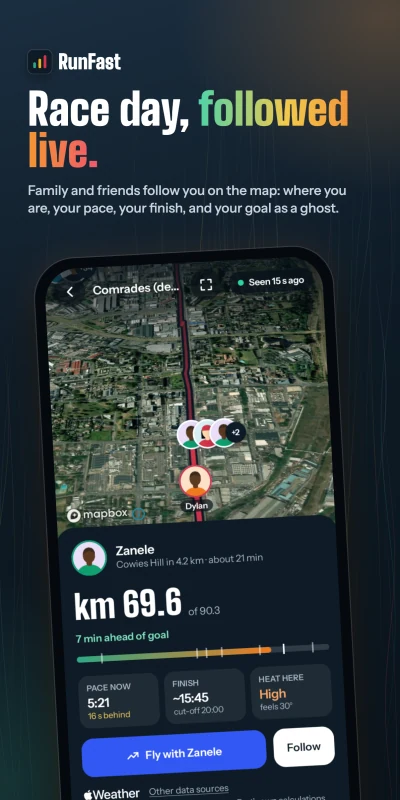
A notification shows you're live, with Pause and Stop, and the app shows how far you've come and how many positions are waiting for signal.
- Windline, Android: the notification says, for example, "Live · 84.2 of 161 km", with the time ridden, Pause and Stop. Live now at the top of the Events screen has them too. Tap it for your taps on the back and who they're from.
- RunFast, Android: a notification shows you're live and how far you've run, with Pause and Stop. The app shows when your position was last sent and how many positions are waiting: "nothing is lost".
- On iPhone, when the apps arrive there, the Lock Screen shows you're live.
Taps on the back reach you quietly while you race. See taps on the back.
How do I pause or stop?
Tap Pause to stop sending for a while and Resume to carry on. Tap Stop to end it: both apps ask first.
- Pause: followers see "Paused", for example "Paused at km 21.1".
- Stop: followers see that you stopped, not that you finished, and where. On Android, Windline asks for your PIN, fingerprint or face before it stops, and RunFast needs your phone unlocked. On Windline, you can start again for the same day.
When does it stop by itself?
At the finish. You don't need to touch the phone.
- Windline stops within 150 m of the end of the course: "You're at the finish. Live tracking has stopped." Your followers get your time.
- RunFast stops at the finish with the same words, and your time goes to your followers.
- If you forget, both stop 3 hours after your planned finish. Windline never stops while you're still moving.
Your race moves to Past the next day, with "Finished in" your time and your taps on the back.
What if it won't start?
The app says what's missing. Fix it and tap Start live tracking again.
| You see | What to do |
|---|---|
| "Windline needs your location to share it" | Open your phone's Settings → Apps → Windline → Permissions → Location and choose Allow only while using the app. |
| "Your phone may stop sharing your position to save battery" | Tap it and allow Windline to run in the background. On a Samsung, Settings → Apps → Windline → Battery → Unrestricted. |
| "Live tracking is off for this race. Edit the race and turn on Live tracking." | Switch on Live tracking for the race in RunFast. |
| "Live tracking is for races. Edit this run and mark it as a race to go live." | It's a casual run. Edit it, choose Race, then switch on Live tracking. |
| "Tap I'm in on the club's race first." | It's a club race: tap I'm in on the club's page first. |
If Android closes the app on a long day, you get Tap to carry on live tracking. One tap carries on with the same race and the same line.
What if I lose signal?
Keep going. Your phone keeps every position and sends them all when it has signal again, and your followers see "No signal" until then. See what happens when you lose signal.
For the setup itself, who sees you and how to share your link, see how to share your live location in a race.
Questions
Do I need to keep the app open while I race?
No. Locking the phone, going to the Home Screen or opening other apps is fine: tracking carries on. Don't swipe the app away in the app switcher, though, or your phone stops sending.
What if I forget to go live?
RunFast reminds you 2 hours before the gun, again 30 minutes before, and once more at the gun, until you're live. Windline reminds you about 30 minutes before the start. You can still start late: followers see you from then on.
Can I go live from my watch or bike computer?
No. Windline and RunFast send your position from the app on your phone. Your watch or computer can keep recording the activity as usual.
What happens if I tap Stop by mistake?
Both apps ask first, so a tap in your pocket can't end it. On Android, Windline also asks for your PIN, fingerprint or face. On Windline you can start again for the same day, and it carries on the same line.
Does going live work on iPhone?
Both apps are on Android today. Both iPhone apps are with the App Store for review; on iPhone you'll choose Allow While Using App, and the Lock Screen shows you're live.