Sharing your positionHow-to
Race-day phone checklist for live tracking
The short answer
The night before, charge to full, check live tracking is on for the race, allow notifications and location while using the app, and on Android set the app's battery use to Unrestricted. On race morning, resend your link and pack a power bank. At the start, tap Start live tracking and don't swipe the app away.
Charge the phone and a power bank
Charge your phone to full the night before. For a long race, charge a small power bank and pack a short cable.
Check live tracking is on for the race
Open the race in Windline or RunFast and check its live tracking card: live tracking on, who can see you, and your goal if you want a ghost.
Allow location and notifications
Allow location while using the app, and allow notifications, so the reminder reaches you and you can see you're live.
Let the app run in the background on Android
Set the app's battery use to Unrestricted in your phone's settings, so it keeps sending with the screen off in your pocket.
Send your link again on race morning
Post your follow link once more in the family chat, so it's easy to find when people want to watch.
Go live at the start, then leave the app running
Tap the reminder or Go live, then Start live tracking. Lock the phone and put it away, but don't swipe the app away in the app switcher.
Live tracking is only as good as the phone in your pocket. Most race-day problems come from three things: a flat battery, a phone that puts the app to sleep, and a link nobody can find. This checklist covers all three, for Windline and RunFast, from the night before to the finish.
The night before
Do the setup when you're calm, not on the start line. Every item here takes a minute.
| Check | Why |
|---|---|
| Phone charged to full | GPS runs for the whole race |
| Power bank charged, cable packed | For a long race, a long ride or a long day of waiting at the start |
| The app updated and signed in | You go live as yourself, from your own account |
| Live tracking on for the race | Windline switches it on for a new race. RunFast leaves it off until you switch it on. |
| Who can see you, checked | Your link, your club, and Findable by anyone only if you want it |
| Notifications allowed | The reminder before the start comes as a notification |
| Location allowed, while using the app | The app doesn't need "always" |
| Battery use set to Unrestricted (Android) | So the phone doesn't stop the app in your pocket |
| Your link sent | People look for it on race morning |
Which Android settings matter?
The one that matters most is battery. Some Android phones, Samsung among them, put apps to sleep to save battery, which would stop your position going out with the screen off.
| Windline | RunFast | |
|---|---|---|
| Location | While using the app (Settings → Apps → Windline → Permissions → Location) | Allow location (Settings → Apps → RunFast → Permissions) |
| Notifications | Allow, on Android 13 and newer | Allow |
| Background | When Windline asks to keep running in the background, tap Allow, then Allow again | — |
| Battery | On a Samsung, Settings → Apps → Windline → Battery → Unrestricted | Settings → Apps → RunFast → Battery → Unrestricted (on some phones, Don't optimise) |
If Android closes the app anyway, you get a notification: Tap to carry on live tracking. One tap carries on with the same race and the same line. The full steps are in each app's help: Windline on Android and RunFast on Android.
And on iPhone?
Both iPhone apps are with the App Store for review. When they're out, the first time you go live your iPhone asks to use your location: choose Allow While Using App. The Lock Screen shows you're live. Going to the Home Screen, locking the phone or opening other apps is fine, but if you swipe the app away in the app switcher, your iPhone stops sending your position.
On race morning
Send your link again, pack the phone where you can reach it, and check the reminder is coming.
- Send your link once more in the family chat, and pin it. See how to get friends and family following you.
- Pack the phone where it's secure and you can reach it: a zipped pocket, a running belt or a bike's top-tube bag. GPS works through a pocket.
- Watch for the reminder. Windline reminds you about 30 minutes before the start. RunFast reminds you 2 hours before the gun, then 30 minutes before, then at the gun, until you're live.
At the start
Tap Start live tracking, then lock the phone and put it away.
- Windline: tap the reminder, or Go live on your club, then Start live tracking.
- RunFast: tap Go live on the reminder, and tracking starts straight away. Or open the race and tap Go live, then Start live tracking.
A notification shows you're live, with Pause and Stop. The step-by-step version, with what to do if it won't start, is in go live on race day.
During the race
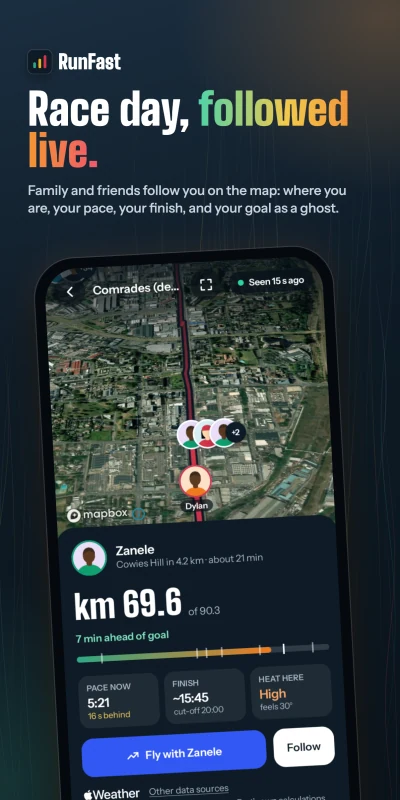
Leave the phone alone. It sends your position every 30 seconds, and keeps every position when there's no signal.
- Don't swipe the app away. Locking the phone and opening other apps is fine.
- No signal is normal in valleys and on rural roads. Your followers see "No signal" and when you were last seen, and the line fills in later. See what happens when you lose signal.
- Taps on the back arrive quietly. On Windline, one buzz and no sound. You can look at who they're from later.
- Pause if you need to stop sending for a while, and Resume to carry on.
After the finish
Do nothing: tracking stops by itself. Windline stops within 150 m of the end; both stop 3 hours after your planned finish if you forget. Your followers see your time, and for 24 hours they can send a congratulation.
The next day, the race moves to Past, with "Finished in" your time and your taps on the back.
What should my followers know before the start?
Three things, and they'll save you messages from home. Send them with your link.
- It opens in a browser. No app, no account. If they want an alert when you start, reach halfway and finish, they can follow you in the app.
- A still dot usually means no signal. It catches up when your phone has signal again, and the page says when you were last seen.
- Times are the race's. Finish times on your page are in the race's own time zone, which matters for family abroad.
You can also tell them about taps on the back: the button on your page buzzes your phone, once a minute per person.
What about my watch or bike computer?
Keep using it as usual. Live tracking comes from the Windline or RunFast app on your phone, so a watch or a bike computer can record your activity at the same time. Neither app reads your position from it. If you're weighing up Garmin's own live tracking, see Garmin LiveTrack alternative for race day; for a safety contact on Strava, see Strava Beacon alternative for race day.
How much battery does live tracking use?
More than a normal day, because GPS runs the whole time. How much depends on your phone, its age, the signal and what else you use it for, so neither app gives one figure.
What helps:
- A full charge at the start, and a power bank on anything long.
- The screen off. A lit screen uses a lot of battery, so lock the phone and leave it in your pocket.
- Fewer other apps. Music, photos and maps all use battery too.
- Not flight mode. Live tracking needs mobile data to send your position.
Windline takes a position about every 25 metres you move and sends them every 30 seconds. RunFast sends every 30 seconds.
What if something goes wrong?
Most problems have a quick fix.
| What happens | What to do |
|---|---|
| The reminder didn't come | Open the race in the app and tap Go live |
| "Needs your location to share it" | Allow location while using the app, in your phone's settings |
| The app stopped in your pocket | Tap Tap to carry on live tracking, then set battery use to Unrestricted |
| Your phone died | Charge it, open the app and start again. On Windline, it carries on the same day and line. |
| Nobody can see you | Check they have your current link. If you reset it, send the new one. |
For the full picture, from adding the race to who can see you, see how to share your live location in a race.
Questions
Does live tracking drain my phone's battery?
It uses GPS for the whole race, so it uses more battery than a normal day. Start with a full charge, keep the screen off, and carry a power bank on a long race. Windline and RunFast send your position every 30 seconds.
Should I put my phone in flight mode to save battery?
No. Live tracking sends your position over mobile data, so flight mode would stop your followers seeing you. Where there's no signal, the app keeps every position and sends them when it's back.
Will live tracking work with the screen locked?
Yes. Locking the phone, going to the Home Screen or opening other apps is fine. On Android, set the app's battery use to Unrestricted so the phone doesn't put it to sleep.
What happens if my phone dies during the race?
Your followers see your last position and when you were last seen. When the phone is back on, open the app and start live tracking again: on Windline it carries on with the same race day and the same line.
Can I use my phone for music or photos while I'm live?
Yes. Opening other apps is fine and tracking carries on. They use battery too, so on a long race a power bank matters more.