Following liveExplainer
What is a tap on the back? Cheers that reach their phone
The short answer
A tap on the back is a cheer you send from someone's live page on Windline or RunFast. Their phone buzzes, and they see how many taps they've had, with the names of people who were signed in. Anyone who can see them can send one, once a minute, with no account, and for 24 hours after the finish.
A tap on the back is a cheer you send to someone in a race from their live page. Their phone buzzes, the count goes up, and, if you were signed in, they see your name. It's a shout from the roadside that works from anywhere. This page explains both sides: sending one, and getting them.
What is a tap on the back?
A tap on the back is a single cheer, sent with one button, that the rider or runner feels on their phone while they race. It's not a message and not a voice note. It's a buzz, a sparkle and a count, with names for people who were signed in.
Windline (cycling) and RunFast (running) both have them, and they work the same way: on the live page in any browser, in the apps, and on livedot.me under Your people.
How do I give one?
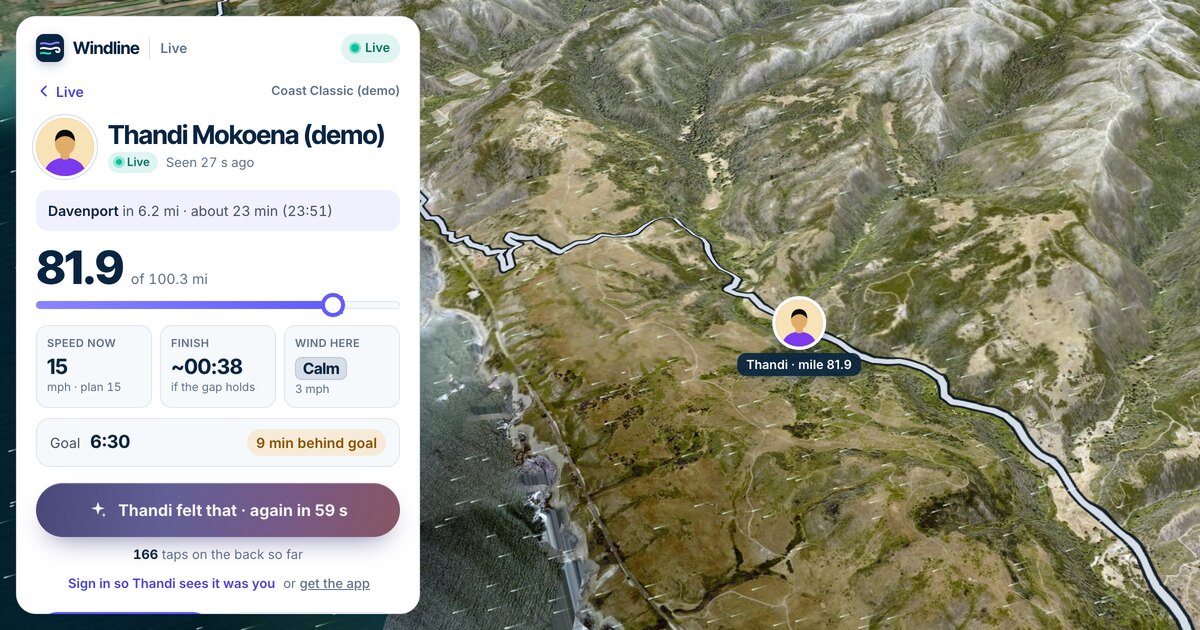
Open the person's live page and tap the button under their card: Give Thandi a tap on the back, with their name. The button then says they felt it and when you can tap again: "Thandi felt that · again in 58 s".
When to send them, and other ways to cheer from far away, are in how to cheer someone on when you can't be there.
Why a tap, and not a message?
Because in the middle of a race nobody reads messages. A rider has their hands on the bars and a runner has 30 km to go; a phone that keeps lighting up with texts is a distraction and a drain on the battery. A tap is built for that moment: it arrives quietly, it's felt rather than read, and it's counted, so the names are waiting for them afterwards. Messages still belong before the start and after the finish.
Where can I send one?
Wherever you can see them live.
- Their live page, from their link: windline.tech/f/… or runfast.tech/f/….
- A race's live map: tap the person, then the button on their card.
- livedot.me: under Your people, every live person's card has its own tap button, with "taps on the back so far" under it.
- The apps: on the rider's or runner's live screen.
Who can give a tap on the back?
Anyone who can see the person: someone with their link, someone who follows them, or anyone who found them by name because they're Findable. No account is needed, and it works the same in a browser, in the apps and on livedot.me.
Do they see who it was?
Yes, if you're signed in. They see your first name and initial: "Thandi M., Sipho K. and 12 others". Not signed in, your tap counts, but without a name.
- On Windline's live page, after a tap it says Sign in so Thandi sees it was you. You can sign in afterwards: your name goes on the taps you gave from that browser or phone in the last 30 days, and the rider's count stays the same.
- In Windline's Android app, a card says Your tap went in as "Someone", with Sign in or create an account.
- On RunFast, sign up, and they'll see it was you.
The name is the one on your account, first name and initial, never your email.
What are the limits?
One tap a minute per person. There's also a limit per connection, so nobody can flood someone with taps. A blocked person can still press the button, but their taps don't reach the rider or runner, and nothing is kept.
What happens on their phone?
Their phone buzzes and they see the count, quietly, while they race. Each app shows it in its own way.
| Windline | RunFast | |
|---|---|---|
| The buzz | One buzz, never a sound | A buzz |
| Where it shows | The live notification shows who tapped for about 10 seconds, then the count | iPhone: a sparkle on the Lock Screen and in the Dynamic Island, with who it was from. Android: the same words on the live notification, then the count. |
| How soon | With the phone's next update | With the phone's next update, within about 30 seconds |
| The list, while live | Live now at the top of Events, then the taps line | The live bar, then Taps on the back |
| The list, afterwards | The race under Past: Your taps on the back | The race in Past: Your taps on the back. Also on runfast.tech, in the race's ⋯ menu. |
The list shows the total, everyone who was signed in by name with how often and when, newest first, and how many came from people who weren't signed in. Only the rider or runner sees it.
What if they have no signal?
Tap anyway. Taps reach them with their phone's next update, so when the signal comes back, the taps given in the meantime are waiting for them. The count on their page includes them straight away.
Can I tap after they finish?
Yes, for 24 hours. The button becomes Congratulate Thandi. They get at most one notification every 5 minutes, such as "12 more taps on the back". After a day, a tap says "Their finish was more than a day ago."
How do I turn taps off?
In the app's settings. Off, people following you can't give you one, and it takes effect at once, even mid-race.
- Windline: Settings, then switch off Taps on the back. It's there once you're signed in, and it's on unless you switch it off.
- RunFast: You, then switch off Taps on the back. People following you then don't see the button.
On livedot.me, a person with taps off shows "has taps turned off" where the button would be.
How do I stop one person's taps?
Block them. Their taps don't reach you, they stop following you and they can't follow you again. In both apps you can block someone from your followers or from your taps list; on RunFast you can also do it on runfast.tech, from Your taps on the back. See how to stop someone following you.
What's kept, and for how long?
The names of the people who tapped you are kept for 30 days. After that, only the count stays. On Windline, a tap given without signing in is kept against a random id for that phone or browser, never a name, so a name can go on it if they sign in; it's deleted 30 days after the last tap given that way. More in live tracking privacy.
Do taps work on stage races and club races?
Yes. On a stage race, taps work on each day's stage while the rider is live, and for 24 hours after they finish. On a club race, open the rider or runner from the club's race map and tap, as on any race.
Where can I try one?
On a demo. Thandi at the Coast Classic and Megan at Comrades are simulated, always mid-race, and the tap button works as it does on race day.
Getting taps for your own race starts with your link: see how to get friends and family following you.
Follow someone live on livedot.me, and give them a tap on the back.
Questions
Do I need an account to give a tap on the back?
No. Anyone who can see the rider or runner can tap, in any browser or in the app. Signed in, your first name and initial go with it; not signed in, you're counted but not named.
Does a tap make a sound on their phone?
On Windline, no: one buzz, never a sound, and the live notification shows who tapped for about 10 seconds. On RunFast, a buzz and a sparkle on the Lock Screen or the live notification, with who it was from.
Can I see who gave me a tap on the back?
Yes. The list shows everyone who was signed in, by first name and initial, how often and when, plus a count of taps from people who weren't. Only you see it.
How long are taps kept?
The names of the people who tapped you are kept for 30 days. After that, only the count stays.
Can I stop someone giving me taps?
Yes. Block them, and their taps don't reach you. To stop taps from everyone, switch off Taps on the back in the app's settings.