Following liveGuide
The best MCP servers for runners and cyclists
The short answer
For live races and race-day weather, search for livedot in ChatGPT or Claude (the livedot MCP, https://livedot.me/mcp): free, no sign-in. For your own training data, Strava's official connector reads your activities with a Strava subscription, and community servers connect Garmin Connect and Intervals.icu with your own login or API key. For general weather, Open-Meteo-based servers work anywhere.
ChatGPT and Claude can now call outside tools through MCP, the Model Context Protocol, and a handful of those tools are built for people who run and ride. They answer different questions. Some read your own training history; one follows other people live in a race; some read the weather. This guide lists the ones that genuinely exist as of October 2026, what each is for, and what it asks of you, from each project's own documentation. We make one of them, livedot, and say so where it comes up.
Which one do I need?
Start from the question you want answered.
| Your question | The server | Who makes it | What it needs |
|---|---|---|---|
| "Where's my friend in the race, and when will they finish?" | livedot | livedot (Windline and RunFast) | Nothing: free, no sign-in |
| "What will the weather be on race day, along the course?" | livedot | livedot | Nothing: free, no sign-in |
| "How did my training go this month?" | Strava MCP connector | Strava | A paid Strava subscription |
| "How did I sleep, and what did my watch record?" | garmin_mcp | Community (open source) | Your Garmin Connect login, on your computer |
| "What's my training load, and what's planned?" | intervals-mcp-server | Community (open source) | An Intervals.icu API key |
| "What's the weather in a town this week?" | Open-Meteo servers | Community (open source) | Usually nothing |
Most people end up with two: one for their own data, and livedot for races and other people.
livedot: live races and race-day weather
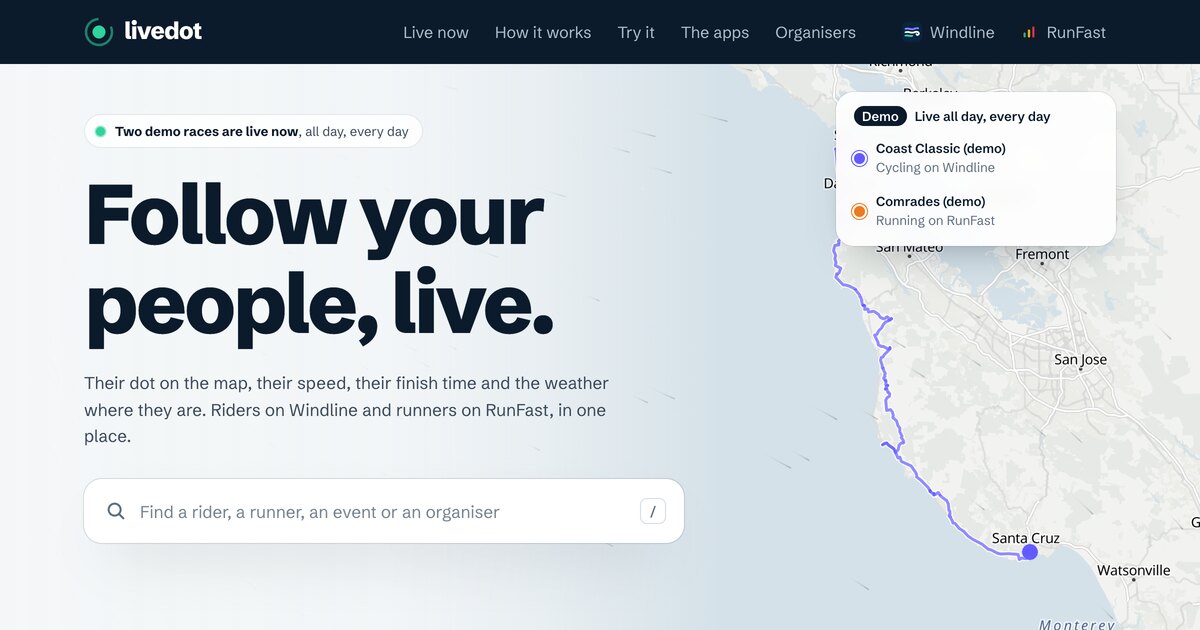
livedot is the live tracking platform behind Windline (cycling) and RunFast (running). In ChatGPT and Claude, search for livedot; developers know it as the livedot MCP, at https://livedot.me/mcp. It's the one on this list we make.
What you can ask:
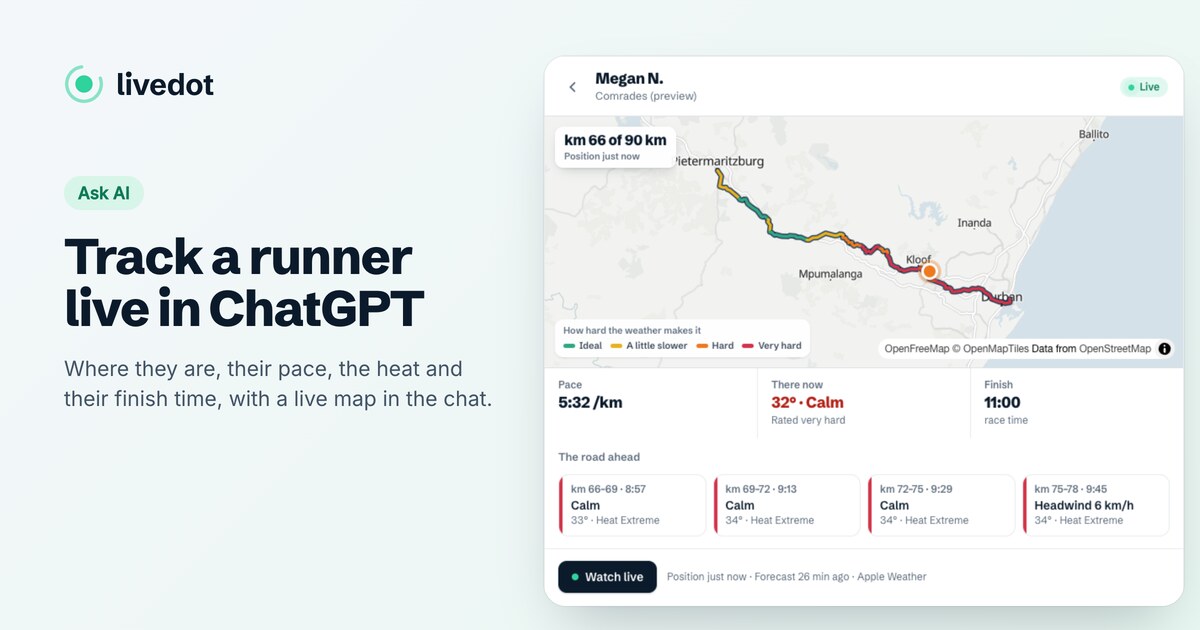
- Where someone is in a live race: "Where's Megan in the Comrades?" Their km, pace, goal, the weather where they are and on the road ahead, and their finish time, with a live map. See how to track a runner live in ChatGPT.
- How a race is going: time under way, how many are on the course, who's furthest along.
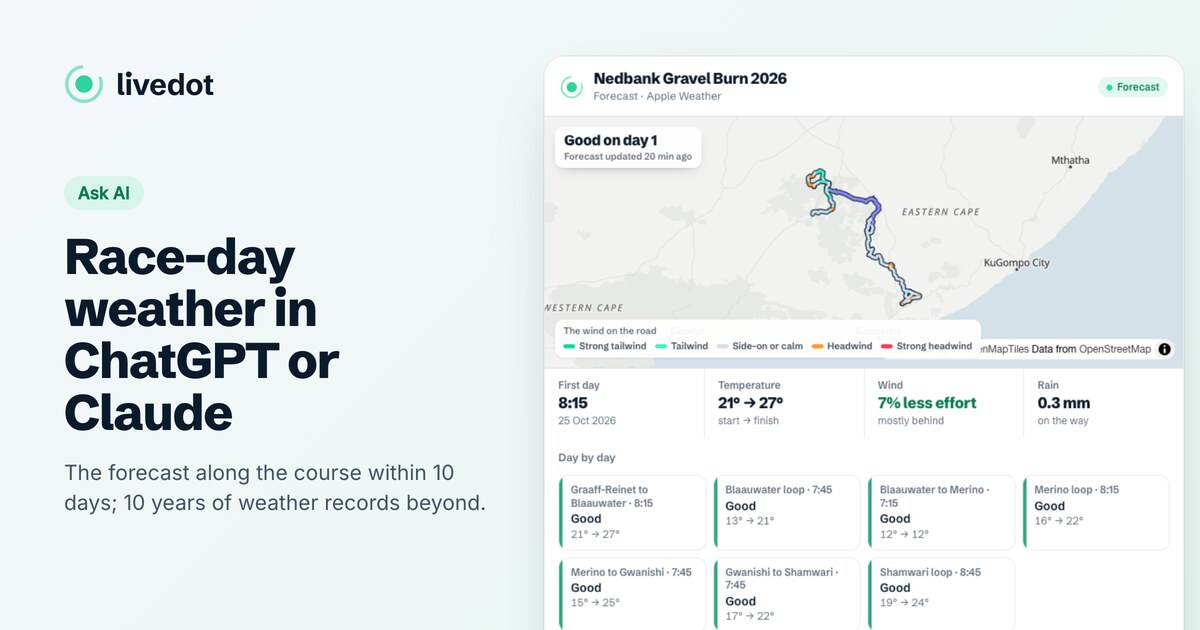
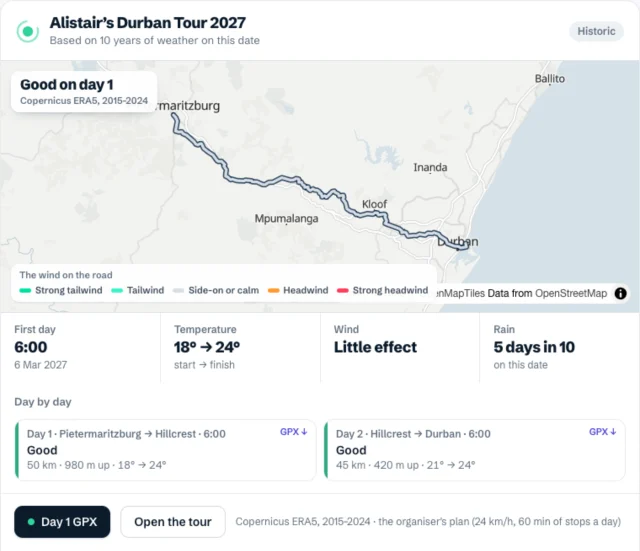
- Race-day weather along the course: the live forecast within 10 days, and 10 years of weather on the date beyond, labelled as history. See how to check race-day weather with ChatGPT or Claude.
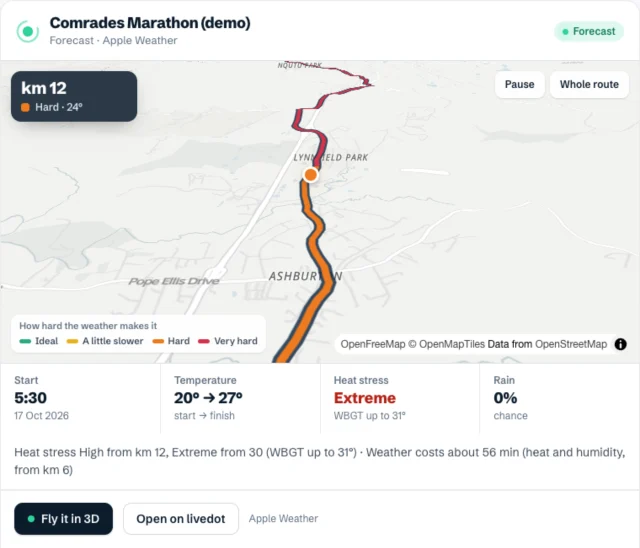
- "Fly the Comrades": a flyover of the course in the chat, coloured by the weather, with a link to fly it in 3D.
- A cycling tour's route: every day with its distance, climbing and weather, and GPX files when the organiser shares them.
- A tour organiser's notes for riders: "What should I pack?", answered from the organiser's own words.
What it needs: nothing to follow races or read the weather: no sign-in, no API key. Organisers can sign in with their Windline or RunFast account to make and publish their own events: see the livedot MCP for organisers. It reads only what's public on livedot: people who chose to be findable, on public races, with no position while they're stopped or near the start or finish.
Where it works: Claude (custom connectors, every plan; the Free plan includes one), ChatGPT on plans that allow custom MCP servers, Claude Code, Cursor and any other MCP client. Setup is at livedot.me/mcp; the code is open source at github.com/livedotme/mcp.
What it doesn't do: it doesn't read your training history. For that, use one of the training servers below. For a route of your own, attach its GPX and ask for the weather on it.
Strava's MCP connector: your own activities
Strava's official connector gives subscribers conversational access to their own activity data. Per Strava's help centre, it began rolling out on 1 June 2026, launched with Claude, and Strava says it's looking to support other AI clients.
- What it reads: your activities and your subscription's training analytics, live from Strava.
- What it needs: a paid Strava subscription. Trial users get access once the trial converts.
- Read only: Strava says it can't upload or edit activities.
- The address:
https://mcp.strava.com/mcp.
Good for: "How does this month compare with last month?", "Which of my rides had the most climbing?" It's about you, not about a race you're watching.
Community Strava servers also exist, such as r-huijts/strava-mcp. They use your own Strava API credentials rather than the official connector, so Strava's support doesn't cover them.
Garmin Connect: a community server
We didn't find an official Garmin MCP server as of October 2026. The most widely used community one is Taxuspt/garmin_mcp, MIT licensed.
- What it reads: your recent activities and their detail, and health data such as steps, heart rate, sleep and stress.
- What it can change: some activity details, such as the name, type and notes, so it isn't read only. Its README shows how to switch on only the tools you want.
- What it needs: your Garmin Connect login. It runs on your own computer and signs in to Garmin as you, with your email and password or a saved token.
- Where it works: desktop MCP clients, such as Claude Desktop. It isn't a hosted address you paste into ChatGPT.
Garmin's own LiveTrack is a separate thing: it shares where you are during an activity, and no MCP server we found reads it.
Intervals.icu: training load and plans
mvilanova/intervals-mcp-server, GPL-3.0, connects Claude and ChatGPT to the Intervals.icu API: activities, events, workouts and wellness data. Intervals.icu can sync with Garmin Connect and other platforms, so some people use it as the bridge for their watch data.
- What it needs: an Intervals.icu account and API key, and a local setup.
- Good for: fitness, fatigue and form, and what's planned this week.
There are other community Intervals.icu servers too, some of which can write planned workouts. Check what each one can change before you add it.
Weather: Open-Meteo-based servers
Several open-source servers wrap Open-Meteo's free weather API, for example cmer81/open-meteo-mcp (MIT). They answer "What's the weather in Durban this week?" well, for any town. That one needs no API key; its README notes Open-Meteo is free for non-commercial use.
What they don't do is time the weather to a route. A marathon's km 35 or a tour's day 5 isn't a town, and the weather there depends on when you arrive. That's the gap livedot's race-day weather fills: the forecast along the course, at the times people reach each stretch, with the wind against the direction of travel for riders and the heat at a runner's pace.
How do I add one?
Every server here goes in the same place:
- Claude: Customize > Connectors > + Add > Add custom connector, then the name and the server's address. Anthropic's guide covers every plan: Get started with custom connectors using remote MCP.
- ChatGPT: Plugins > + > Add custom MCP server, on plans that allow them. OpenAI's guide: Connecting custom MCP servers in ChatGPT.
- Servers that run on your computer (like garmin_mcp) go in your MCP client's config instead; each README shows how.
Strava's connector, where it's offered, appears in Claude's connector directory, so you search for it rather than pasting an address.
How do I choose a safe one?
Ask four questions before you add any server:
- Who runs it? A service's own server (Strava's, livedot's) is supported by that service. A community server is someone's open-source project: often excellent, but check how recently it was updated.
- What does it sign in to? Some need nothing, some an API key, some your account password. Prefer the least. Never paste a password into a config file if the project offers a token instead.
- Can it change anything? Read-only servers can only answer. Servers that write (upload activities, create workouts) deserve a closer look.
- What does it see? livedot sees only public race data, plus your own events if you sign in; a training server sees your health and location history.
For how live tracking itself handles privacy, see live tracking and privacy. To compare live tracking apps outside the chat, see live tracking for races compared.
Questions
What is an MCP server?
MCP, the Model Context Protocol, is an open standard that lets AI assistants like ChatGPT and Claude call outside tools. An MCP server is one such tool: you add its address to your assistant, and it can then answer from that service's data.
Is there an official Strava MCP server?
Yes. Strava's own connector, at mcp.strava.com/mcp, started rolling out on 1 June 2026. It's read only, it needs a paid Strava subscription, and Strava launched it with Claude.
Is there an official Garmin MCP server?
We didn't find one from Garmin as of October 2026. Community servers, such as Taxuspt/garmin_mcp, connect Garmin Connect with your own Garmin login and run on your computer.
Which MCP server can track someone in a race?
livedot. It finds runners on RunFast and riders on Windline in live public races and answers with where they are, their pace, their goal, their finish time and the weather where they are, on a map in the chat.
Are MCP servers safe to add?
Treat them like any app you give access to. Prefer read-only servers from the service itself, check what sign-in they ask for, and keep passwords out of config files. livedot reads public data only, unless you sign in with your Windline or RunFast account to manage your own events, and you can disconnect that any time.