For organisersHow-to
Invite club members from a CSV with ChatGPT
The short answer
Add livedot to ChatGPT or Claude and sign in with the Windline or RunFast account that runs your club. Attach a CSV or spreadsheet of names and emails and say "Invite these to our club." livedot shows who it will invite and who it will skip; after your yes, each person gets one email, and nobody joins until they confirm.
Most clubs have a list somewhere: last season's members, a sign-up sheet from a stand, a form. With livedot in ChatGPT or Claude, that list becomes invites in one message, checked by you before anything goes out. This guide covers the invites only. For posting the weekly ride or run and checking its weather from the chat, see running a club with AI; for everything organisers can do, livedot's organiser guides.
What do I need?
Three things:
- The club, on Windline or RunFast, with you as its admin (Windline) or a manager (RunFast). You can invite to clubs you run and nowhere else.
- livedot in ChatGPT or Claude, signed in with that account.
- A list with a name and an email for each person, who'd expect to hear from the club.
How do I set it up?
Once, in a couple of minutes:
Add livedot
In ChatGPT or Claude, search for livedot and add it, or add it by its address, https://livedot.me/mcp.
Sign in as the club's admin
The first time you ask for something on the club, livedot opens its sign-in page. Choose Windline or RunFast, sign in on that app's site, and choose Allow.
Attach the list
Attach a CSV or spreadsheet with a name and an email for each person, and say "Invite these to our club."
Check the preview
livedot shows who it's ready to invite and who it will skip, and why. Nothing is sent yet.
Say yes
Each person gets one email to confirm. They join when they confirm, with a free account if they don't have one.
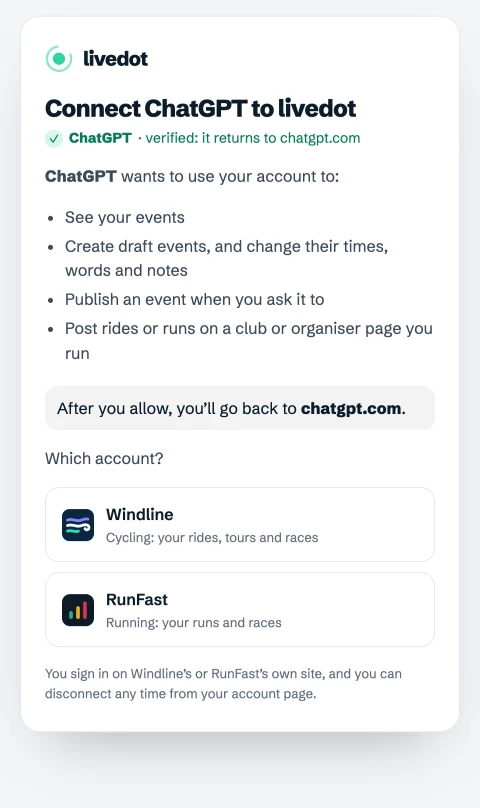
Setup for every app, Claude Code and Cursor included, is at livedot.me/mcp. Your password never reaches livedot or the assistant. livedot keeps no account data: every change is made by Windline's or RunFast's own server, with the same rules as your dashboard.
How do I invite members from a spreadsheet?
Attach it and say which club.
- Attach a CSV or spreadsheet with a name and an email for each person. Any layout works, with or without a header row, up to 2,000 people.
- Say "Invite these to our club." If you run more than one, name it: "Invite these to the Fourways Striders."
- livedot shows who it's ready to invite, and who it will skip: anyone listed twice, invited before, unsubscribed from livedot invites, or without a usable email. Nothing is sent yet.
- Say yes. Each person gets one email from livedot: "[Your club] added you as a member", with Confirm.
Confirm signs them in, or makes a free account, and makes them a member. Nobody joins until they confirm, and the invite ends after 30 days. Every email has This wasn't me and Unsubscribe from livedot invites.
How many can I invite?
| Who's inviting | Invites a day |
|---|---|
| A club's admin or manager | 500 |
| An account less than a week old | 20 |
livedot also has an overall limit of 2,000 a day across everyone. A list longer than today's limit isn't lost: the preview says how many go today, and you can send the rest tomorrow.
Who should I invite?
Only people who'd expect to hear from you: members, people who signed up at your stand or on your form, people who asked to be told about the club. An invite is one email, but it comes in your club's name.
- Last season's members who haven't joined on the app yet.
- Sign-ups from a stand or a beginner course, while the day is fresh.
- A partner club's riders or runners, for a joint event, if they've agreed.
Not a bought list, and not everyone in your phone. Planning for New Year sign-ups? See fill your January intake.
What happens after they confirm?
They're members, the same as anyone who tapped Join the club on the page. They see the club's rides or runs with their weather, and say I'm riding on Windline or I'm in on RunFast. None of them needs ChatGPT or Claude.
The apps' help pages have the details: Windline and RunFast.
What can't it do?
- Add anyone without their yes: every member confirms.
- Delete members or invites.
- Invite on a club you don't run. Organiser pages on Windline can't send invites.
- Keep your list: livedot reads it to make the invites, and Windline's or RunFast's server keeps only the invites themselves.
Disconnect any time from your account on Windline or RunFast, under AI assistants: it stops at once, and what it made stays. All of it is free for the club and every member, thanks to ProLend.
Questions
Can I invite members from a CSV file?
Yes. Attach a CSV or spreadsheet with names and emails and say which club. livedot shows who it will invite and who it will skip; after your yes, each person gets one email to confirm. Nobody joins until they confirm.
How many people can I invite?
Up to 500 a day as a club's admin or manager, or 20 a day from an account less than a week old. A list can hold up to 2,000 people; the preview says how many go today.
Who gets skipped?
Anyone listed twice, invited before, unsubscribed from livedot invites, or without a usable email. The preview lists them before anything is sent.
What does the email say?
"[Your club] added you as a member", with Confirm, This wasn't me and Unsubscribe from livedot invites. The invite ends after 30 days.
Does it work for running clubs?
Yes. Cycling clubs invite to their Windline page and running clubs to their RunFast club. Organiser pages on Windline can't send invites.