Free for registered charities
Every cause deserves to be followed.
One live map for your fundraisers. Supporters watch your riders, runners and adventurers out there for you, cheer them on, and give to the cause.
No fees, ever. Donations go straight to your own fundraising pages.
Your charity's own page
A permanent home on livedot.me, with your cover, your story and what a gift does, in your words. It is yours to keep, not a page that disappears when the event is over.
See a live example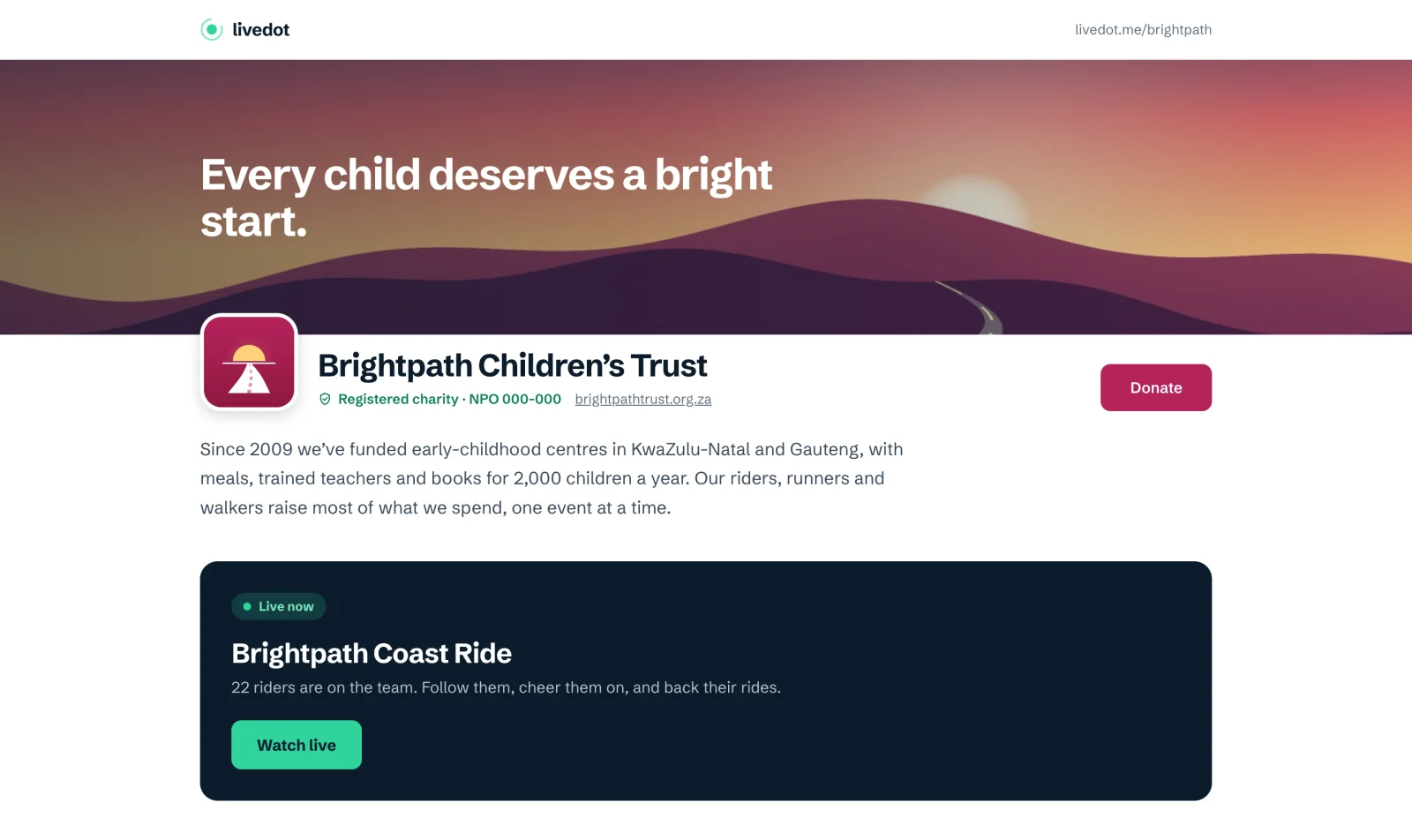
Race morning: your whole team, live
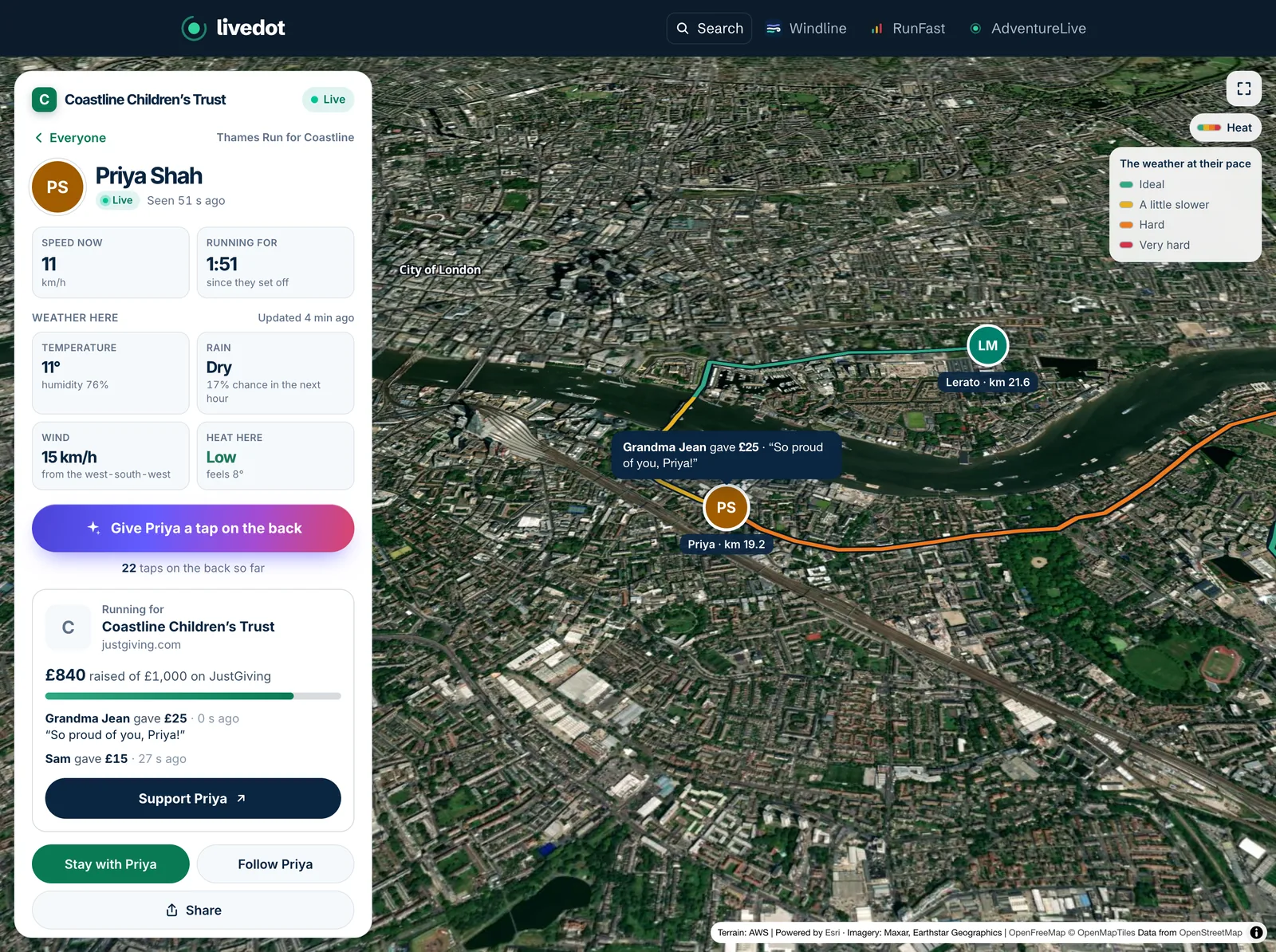
Your page turns over to the day. Supporters open it in any browser, with no app and no account, and follow the people they came for from the first start to the last one home.
See a live example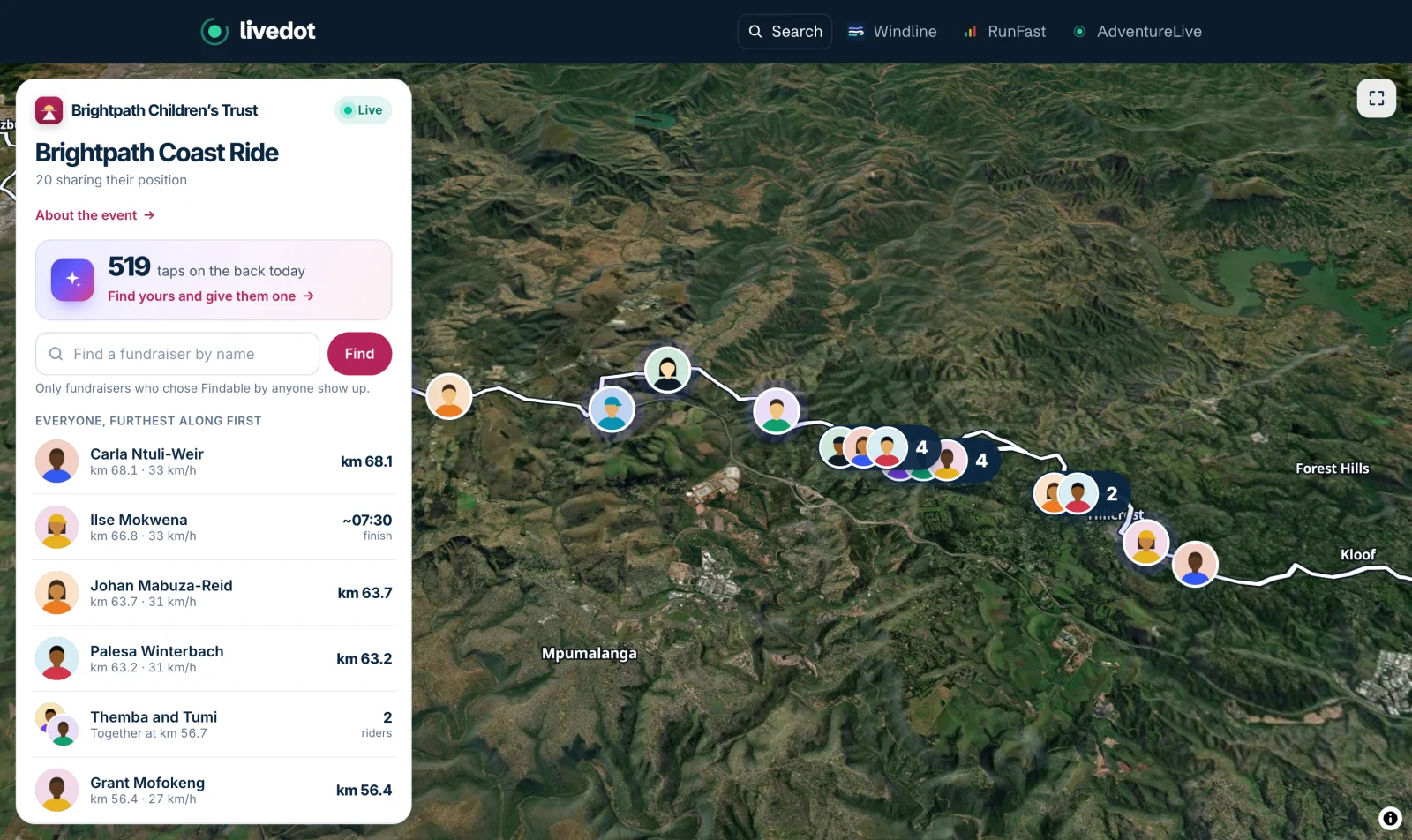
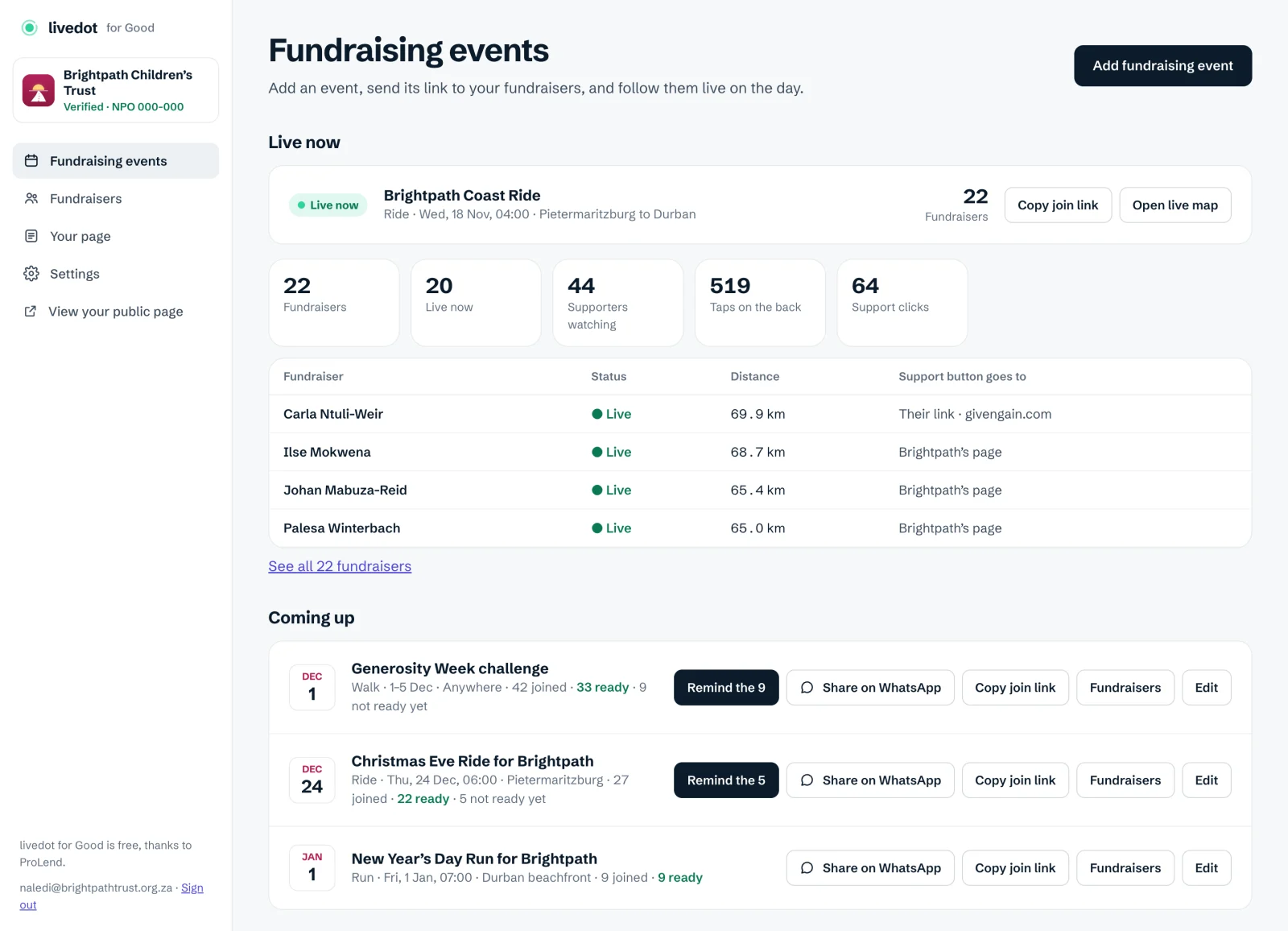
Your dashboard, through the day
Who joined, who is Ready, who is out there now, and how far they have gone. You see the supporters watching, the taps on the back they send, and the Support clicks that follow. Add your next event and send one link; in December, an idea behind every door.
Your fundraisers need nothing new
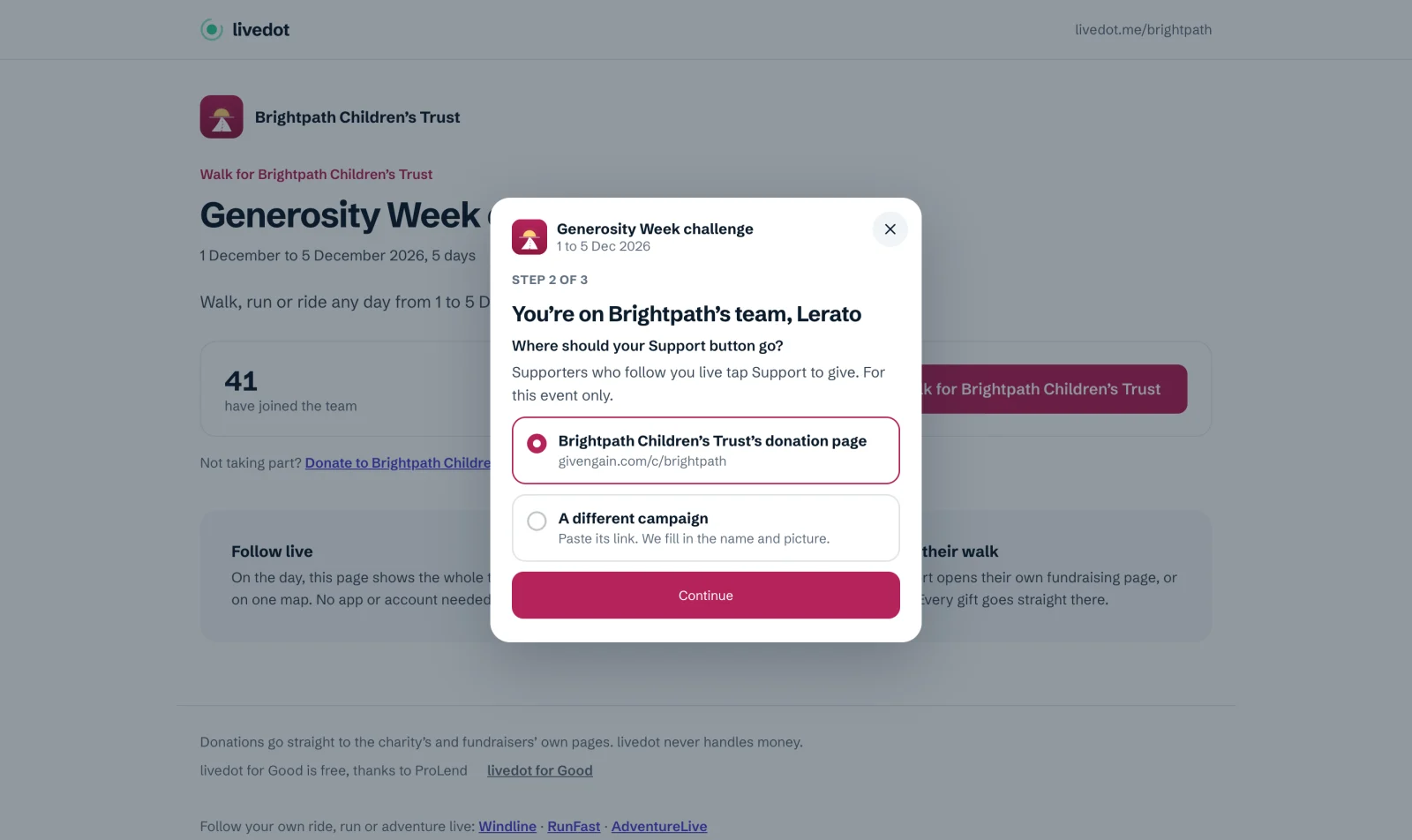
They track with what they already use: the Windline, RunFast or AdventureLive app, or their Garmin. They tap your link once, choose where their Support button goes, and they are on the team.
Using JustGiving? It all comes to your map
- Sign up with JustGiving: we fill in your page from your charity’s JustGiving record.
- Your JustGiving events arrive in your dashboard, ready to set up.
- Fundraisers link their JustGiving page as they join, and can add their live link and their finish map to it.
- Your map shows what the team has raised on JustGiving, and donations as they come in.
livedot isn't affiliated with or endorsed by JustGiving.
Only who chose to be seen
A fundraiser shows on your map only after they join, and only while they're out there. Nobody's home or route is ever shown before or after.
We never touch the money
Every Support button goes straight to a fundraising page: GivenGain, BackaBuddy, JustGiving or your own. No fees, no cut, nothing in between.
Free, for good
Your page and your events stay free, and they stay up after the day. livedot for Good is free, thanks to ProLend.
Already on livedot for Good
Who can apply
Any registered charity or non-profit, anywhere, can apply. On JustGiving? Sign up with it and find your charity there: we fill in your page, and you can be verified at once. Otherwise, apply from an email address on your charity’s own website domain, and we check its registration number against its country’s official register, or the registration certificate or tax-exemption letter it uploads.
Questions charities ask
Who can apply to livedot for Good?
Any registered charity or non-profit, anywhere, can apply. Sign up with Google, an email and password, or your JustGiving account. If your charity is on JustGiving, find it there: we fill in your page from its JustGiving record, its name, logo, colour, description and website, and you can change any of it. Otherwise, apply from an email address on your charity's own website domain, and we check its registration number against its country's official register, or, if that register isn't one we list, the registration certificate or tax-exemption letter it uploads. A free email address, like Gmail, works only through JustGiving: when it's the address your charity publishes there, or with a code we send to that address.
What does livedot for Good cost a charity?
Nothing. livedot for Good is free, thanks to ProLend. That covers the charity page, every fundraising event, the live team map, the reminders and the counts. There are no fees and no cut, because livedot never handles donations. Your fundraisers and supporters pay nothing either.
How does verification work?
We make two checks: that your charity is registered, and that you speak for it. If your charity is on JustGiving, finding it there with its registration number settles the first, with nothing to upload. You're then verified at once when your email is on your charity's website domain, when it's the email your charity publishes on JustGiving, or when you enter the code we send to that published address. Signing in with JustGiving on its own never verifies you. Otherwise, your registration number is checked against your country's official register of charities, for example an NPO or section 18A PBO number in South Africa, the Charity Commission in the UK, or an EIN with the IRS in the US. If your country or register isn't one we list, you choose Other, give what you have and upload your registration certificate or tax-exemption letter, and we verify it by hand. Your sign-up email must be on your charity's own web domain. When both pass, we verify the charity and email you. Until then, your page is not listed anywhere.
What does a fundraiser have to do?
They open your one join link and sign in with Apple, Google or email. They choose where their Support button goes, their own fundraising page or the charity's, and how they'll track: a Garmin with LiveTrack, or the Windline, RunFast or AdventureLive app. A one-minute live test then marks them Ready.
What do supporters see?
Supporters open your map in any browser, with no app and no account. They see the team's dots on one map, can give any fundraiser a tap on the back, and find each fundraiser's Support button, which opens their own fundraising page or the charity's. A fundraiser shows only from the event's start until they stop.
We use JustGiving. How does that work with livedot?
If you sign up with JustGiving, your charity's JustGiving page is linked already. Otherwise, link it once in your dashboard's Settings: we find it by the registration number we verified. Your upcoming JustGiving events then show in your dashboard, ready to set up. Fundraisers choose their JustGiving page as they join, or create one, and can add their live link and their finish map to it. Unless you switch it off, your map shows what the team has raised on JustGiving, and donations as they come in. livedot isn't affiliated with or endorsed by JustGiving.
Where does the money go?
Straight to the charity's and the fundraisers' own fundraising pages. livedot never touches the money and takes no cut: a Support button only opens the page the fundraiser chose. If your charity links its JustGiving page, your map shows what the team has raised on JustGiving, unless you switch it off. livedot counts supporters watching, taps on the back and Support clicks, and nothing personal.