livedot
Connect livedot · free · no sign-in to ask

“Where’s Megan in the Comrades?” Ask your AI.

Add livedot to ChatGPT, Claude, Cursor, VS Code, Gemini, Mistral or a local model, then ask where someone is in a race, “Which cycling club should I join in Johannesburg?” or “Find a coach near Sandton”. One address, no key, no account.

Server URL https://livedot.me/mcp
Where’s Megan in the Comrades?Which cycling club should I join in Johannesburg?Find a coach near Sandton
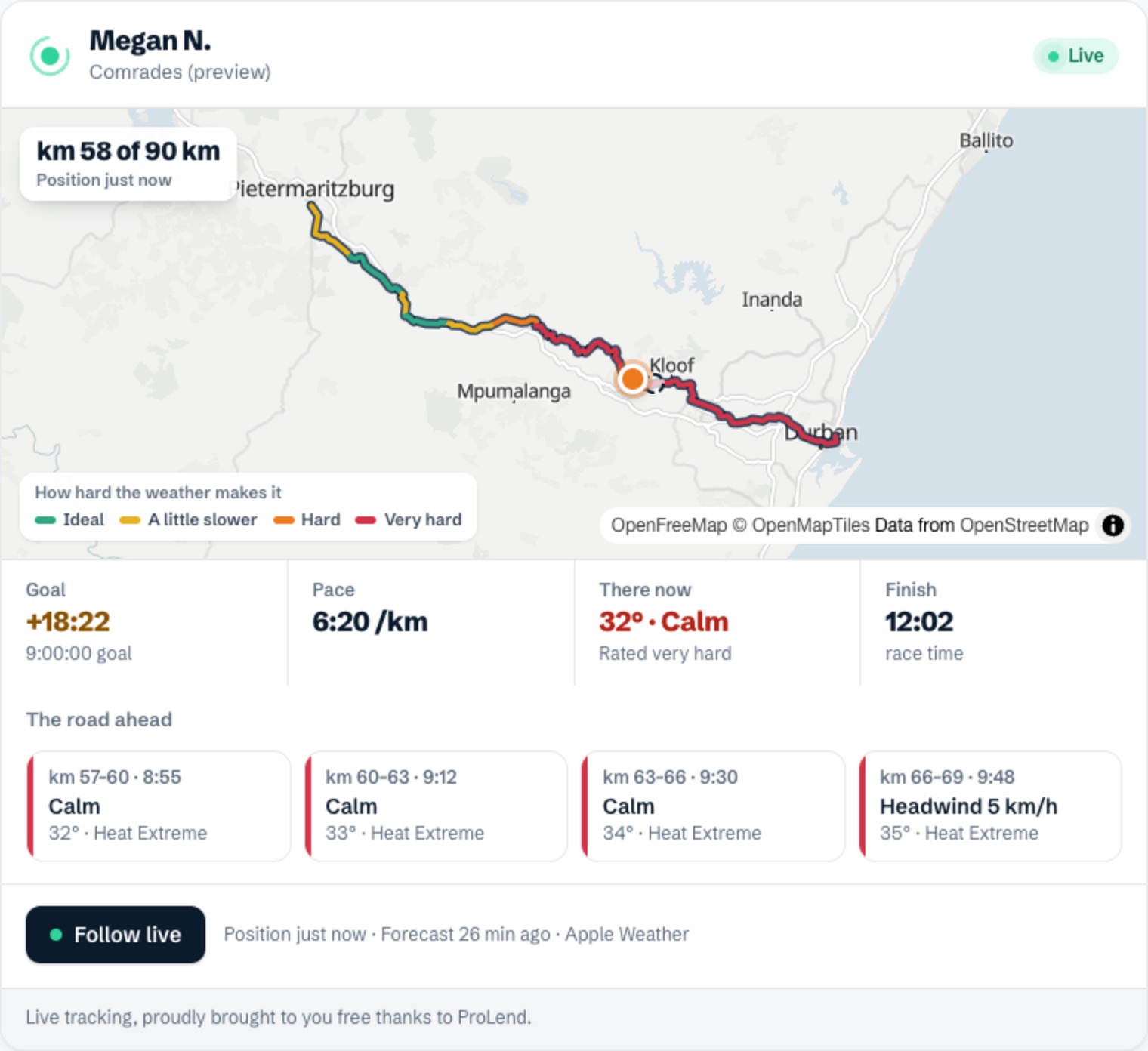
Megan’s live map in the chat: her dot on the Comrades course, coloured by how hard the heat makes each stretch, with her pace, finish time and the road ahead

Connect livedot to your AI

Every app below takes the same address, https://livedot.me/mcp (Streamable HTTP). Asking never needs an account; organisers sign in with Windline or RunFast only to make or change their own events.

ChatGPT

ChatGPT on the web
  1. Open Plugins and search for livedot. If it’s there, install it and skip to step 5.
  2. Not listed for you? Select +, then Add custom MCP server. Name it livedot and, under Connection, paste https://livedot.me/mcp.
  3. Authentication: OAuth or no authentication.
  4. Tick I understand and want to continue, select Create as a plugin, then install it.
  5. In a new chat, type @, pick livedot and ask.

OpenAI lets Business, Enterprise and Edu workspaces add a server by URL (admins and owners, or members they allow), and Pro accounts for read tools, which is all of asking. Web only, not the phone apps.

Sign-in: Never to ask. Organisers sign in with Windline or RunFast when they ask it to work on their own events.

Try“Where’s Megan in the Comrades?”

Steps from OpenAI Help: Connecting custom MCP servers in ChatGPT

Claude

claude.ai and Claude Desktop, every plan
  1. Go to Customize → Connectors, select + Add, then Add custom connector.
  2. Name it livedot, paste https://livedot.me/mcp and select Continue.
  3. Under Authentication choose Sign in when needed, then Continue and Add.
  4. In a chat, select + at the bottom left, then Connectors, and switch livedot on.

The Free plan includes one custom connector. On Team and Enterprise, an owner adds it once in Organization settings → Connectors, and each person selects Connect.

Sign-in: Never to ask. “Sign in when needed” asks only when an organiser wants their own events.

Try“Which cycling club should I join in Johannesburg?”

Steps from Claude Help: Get started with custom connectors using remote MCP

Claude Code

The terminal
  1. Run this (add --scope user to have it in every project):
claude mcp add --transport http livedot https://livedot.me/mcp

Sign-in: Never to ask. Organisers run /mcp, pick livedot and sign in in the browser.

Try“Find a coach near Sandton”

Steps from Claude Code docs: Connect Claude Code to tools via MCP

Cursor

Cursor, every project
  1. Open ~/.cursor/mcp.json (or .cursor/mcp.json for one project) and add livedot under mcpServers:
{
  "mcpServers": {
    "livedot": { "url": "https://livedot.me/mcp" }
  }
}

It shows on Cursor’s Customize page, where you can switch it on and off. Ask in the agent chat.

Sign-in: Never to ask. Cursor runs the sign-in itself when an organiser’s tool needs it.

Try“Where’s Megan in the Comrades?”

Steps from Cursor docs: Model Context Protocol (MCP)

VS Code

GitHub Copilot chat
  1. Run MCP: Add Server from the Command Palette, choose HTTP, paste https://livedot.me/mcp and name it livedot.
  2. Or put it in .vscode/mcp.json (your user file: MCP: Open User Configuration):
{
  "servers": {
    "livedot": { "type": "http", "url": "https://livedot.me/mcp" }
  }
}

In the Chat view, select Configure Tools to check livedot’s tools are on.

Sign-in: Never to ask.

Try“Which cycling club should I join in Johannesburg?”

Steps from VS Code docs: Add and manage MCP servers in VS Code

Windsurf

Now Devin Desktop, and the Devin CLI
  1. Add livedot to ~/.config/devin/mcp_config.json (Windows: %APPDATA%\devin\mcp_config.json). In Cascade, the … menu → Open MCP config file opens it.
{
  "mcpServers": {
    "livedot": { "url": "https://livedot.me/mcp" }
  }
}
devin mcp add -s user livedot https://livedot.me/mcp

The second line does the same from the Devin CLI.

Sign-in: Never to ask. Organisers: devin mcp login livedot.

Try“Find a coach near Sandton”

Steps from Devin docs: Cascade MCP integration, Devin CLI docs: MCP configuration

Gemini CLI

And Antigravity CLI
  1. Run:
gemini mcp add --transport http --scope user livedot https://livedot.me/mcp

On Antigravity CLI (Google moved free and Google One users to it on 18 June 2026), add it to ~/.gemini/config/mcp_config.json instead:

{
  "mcpServers": {
    "livedot": { "serverUrl": "https://livedot.me/mcp" }
  }
}

Sign-in: Never to ask. Organisers: /mcp auth livedot in Gemini CLI.

Try“Where’s Megan in the Comrades?”

Steps from Gemini CLI docs: MCP servers with Gemini CLI, Antigravity docs: Migrating from Gemini CLI

Mistral Vibe

Formerly Le Chat
  1. Open Connectors, select + Add Connector and switch to the Custom MCP Connector tab.
  2. Connector name livedot, Server URL https://livedot.me/mcp, then Connect. Mistral works out the sign-in itself.

Adding a connector is for admins: on Free, Pro and Student the account owner is the admin. Mistral doesn’t show MCP resources yet, so answers come in words, without the live map.

Sign-in: Never to ask.

Try“Which cycling club should I join in Johannesburg?”

Steps from Mistral docs: MCP Connectors

Ollama and local models

Through an app that adds MCP

Ollama runs the models; it has no setting of its own for adding an MCP server. Use livedot with a local model through one of these:

  • Open WebUI (runs your Ollama models; 0.6.31 or later, admins): Settings → Admin → Integrations. Under External Tool Servers, select + Add Connection, Type MCP (Streamable HTTP), URL https://livedot.me/mcp, Auth None, then Save. In a chat: + → Integrations → Tools, switch livedot on.
  • LM Studio (its own local models; 0.3.17 or later): Add to LM Studio, or the Program tab → Install → Edit mcp.json and add "livedot": { "url": "https://livedot.me/mcp" } under mcpServers.
  • Claude Code on Ollama: start it with ollama launch claude, then add livedot as in Claude Code.

Pick a model that’s good at tool calling: a small model can ignore the tools.

Sign-in: Never to ask.

Try“Where’s Megan in the Comrades?”

Steps from Ollama docs: Integrations, Open WebUI docs: MCP, LM Studio docs: MCP, Ollama docs: Claude Code

Any other app that speaks MCP: add https://livedot.me/mcp as a remote (Streamable HTTP) server. No key, no header. Its tools are listed at /.well-known/mcp/server-card.json.

The livedot plugin (ZIP)

livedot as an agent plugin package: plugin.json, mcp.json with the address, a get-started skill, the icon and screenshots. It’s for apps that install a plugin package, such as Work and Codex in the ChatGPT desktop app. Every other app on this page only needs the address.
Download the livedot plugin (ZIP)
  1. Unzip it into ~/.codex/plugins/livedot.
  2. Add livedot to ~/.agents/plugins/marketplace.json:
{
  "name": "livedot",
  "interface": { "displayName": "livedot" },
  "plugins": [{
    "name": "livedot",
    "source": {
      "source": "local",
      "path": "./.codex/plugins/livedot"
    },
    "policy": {
      "installation": "AVAILABLE",
      "authentication": "ON_INSTALL"
    },
    "category": "Sports"
  }]
}
  1. Restart the ChatGPT desktop app, open the Plugins Directory, choose the livedot source and install it.

Steps from OpenAI’s Package your plugin.